TalkingParents: Co-Parent App
- 2.3
- Rating
- 100.00K
- Installs
- Free
- Price

 Analysis by App-foxy
Co-parenting can become difficult for reasons that have little to do with the children themselves. A missed message, an unclear pickup plan, or a disagreement about a payment can turn an ordinary week into a long chain of stressful conversations. I tested TalkingParents: Co-Parent App with that kind of situation in mind, focusing less on its store wording and more on how it fits into a real household where two adults need a dependable place to coordinate.
My overall impression is mixed but practical. This is not a cheerful family organizer designed for everyone in the home to share. It is a more formal communication tool for separated or divorced parents who need conversations, calls, payments, and calendar details kept together. That focus gives it a useful purpose, but it also makes the experience feel more serious and less flexible than a normal messaging app.
The app is free to install, with optional purchases ranging from around nine dollars to around two hundred fifty dollars per item. It belongs to the Parenting category, is intended for Everyone, and comes from Monitored Communications, LLC. It has passed the point of being a new experiment, having first appeared in June 2016, and the current release is version 9.5.2 for devices running iOS 11 or newer. Its audience is sizeable, with over one hundred thousand installs, although its average rating of 2.3 from around 3,600 ratings suggests that many users have encountered frustrations worth taking seriously.
You May Also Like

 Blood Strike: 2.5 Anniversary
Blood Strike’s Loadouts Turn Every Drop Into a Tactical Gamble
A close look at Blood Strike’s custom loadouts: how fast access to signature weapons reshapes its battle royale rhythm, rewards preparation, and narrows the gap between fights.

 Pandora - Music & Podcasts
Pandora’s Music Is Easy to Start, but Harder to Recover
Pandora’s strength is its low-effort path from a seed to a station. Its weak spot is how much confidence it asks you to place in connection, setup, and quiet recovery.

 8 Ball Pool
 Is Built on Rivalries, Rematches, and Routine
A close look at the rivalries, rematches, shared routines, and unanswered safety questions that turn a quick pool match into a persistent mobile community.

 Samsung Music
’s Quiet Strength Is Playing What You Already Own
Its reach comes less from spectacle than from dependable access to a personal library. That simplicity is both the app’s strongest retention engine and its ceiling.

 AccuWeather: Weather Radar
AccuWeather Review: A Quick, Clear Forecast for Everyday Decisions
For everyday plans, the best forecast is the one you can understand quickly. AccuWeather makes rain timing, radar, and local conditions easy to act on, with a few trade-offs.

 Hill Climb Racing
Why Hill Climb Racing Still Turns Crashes Into One More Run
A tiny car, a bumpy hill and one more upgrade: Hill Climb Racing keeps resurfacing because its simple chaos makes every near-miss feel personal.
More From Our News Desk



How it works in a shared household situation
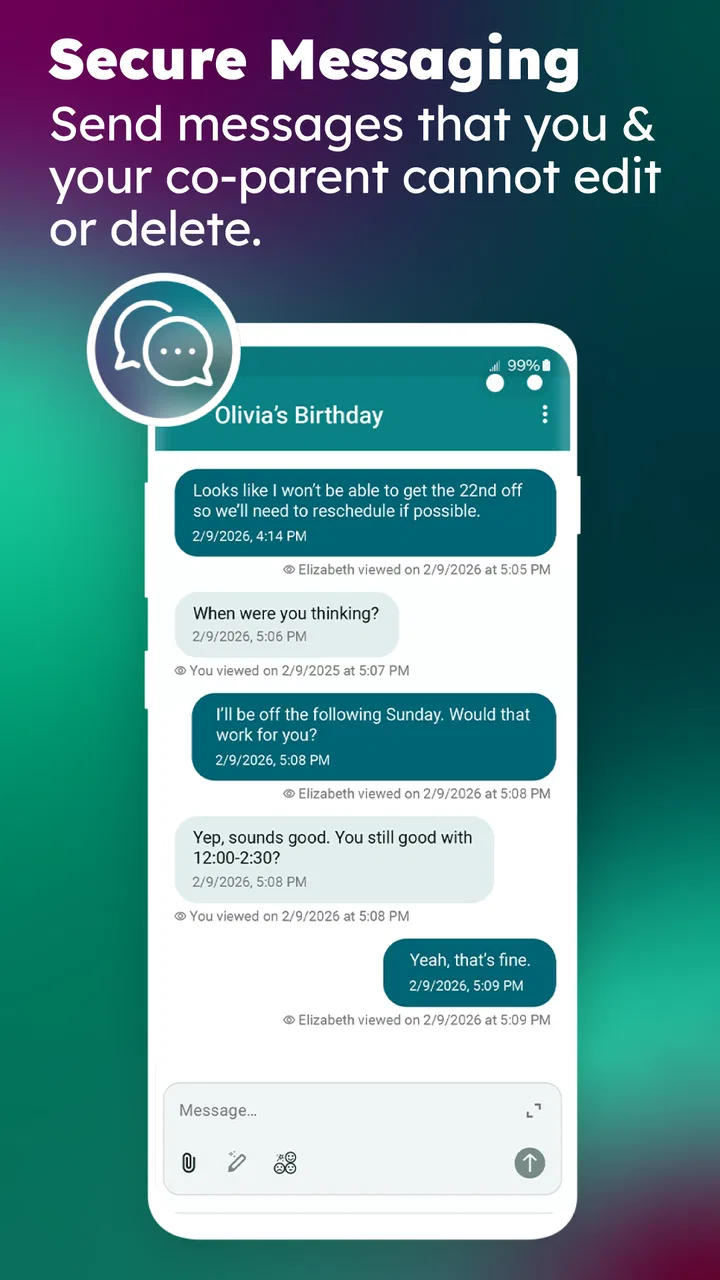
The most convincing use case is a household split between two homes. Imagine one parent needs to confirm that a child will be collected after school, while the other needs to mention a medical appointment and record a reimbursement. In a regular text thread, those subjects quickly become mixed together with unrelated messages, photos, and emotional replies. TalkingParents gives the communication a more deliberate home, which can make practical details easier to find later.
I would not describe it as a shared-family tablet app. A household may use one device to help a child view a schedule, but the core experience is built around the adults who are responsible for communication and decisions. That distinction matters. A child should not be expected to manage parental exchanges, and a shared phone should not automatically be treated as a neutral account space.
For a parent who moves between devices, the appeal is having the same co-parenting conversation available in one dedicated application instead of searching through ordinary SMS threads. The separation from personal messaging can also be useful emotionally. When a conversation is specifically about school, transport, costs, or dates, opening a purpose-built tool may reduce the temptation to mix it with old arguments or unrelated family chat.
There is a trade-off, though. A dedicated app only helps if both adults actually use it. If one person continues sending important information by text, email, or phone while the other expects everything to appear in TalkingParents, the result can be another source of confusion rather than a solution. Before relying on it, both parents need a clear agreement about which channel is used for which kind of message.
Start with boundaries, not buttons
My first recommendation is to decide the account boundaries before setting up daily routines. The app is aimed at co-parent communication, not at giving every relative, babysitter, or child the same role. Keep the parent accounts distinct, avoid treating a shared household device as a permanent substitute for personal access, and make sure each adult knows which account belongs to them.
This is especially important when a tablet or phone is used by several people. A parent may leave the device on a kitchen counter, but that does not mean every family member should be able to browse adult conversations or payment details. The safest household habit is simple: each parent should use their own account and protect access to their own device. If a child occasionally uses the same hardware, switch away from the adult session before handing it over.
I also suggest agreeing on naming conventions for calendar entries and payments. A short label such as “school uniform” or “Saturday pickup” is easier to understand later than a vague note like “important” or “that thing.” This is not a special feature; it is a workflow choice that makes the app’s record more useful. The clearer the entry, the less room there is for a second disagreement about what it meant.
Setup can feel heavier than downloading an ordinary messenger because the purpose is more formal. That is not necessarily a flaw. The extra seriousness may discourage casual, impulsive messages, but it can also frustrate someone who only wants to send a quick update. I would take a little time at the beginning to decide whether the app is going to be the primary channel or simply the place for information that needs to remain organized.
Another practical boundary concerns notifications. In a busy home, constant alerts can make the app feel intrusive, while too few alerts can cause a parent to miss a time-sensitive change. I would start with notifications enabled, then adjust the phone’s notification behavior after seeing how often messages arrive. The important point is to avoid silently assuming that a message has been seen just because it was sent.
Using messages, calls, payments, and calendars together
The strongest part of the concept is the combination of several coordination tasks. TalkingParents brings messages, calls, payments, and calendars into the same co-parenting context. That is more useful than a basic chat app when a family needs to connect a conversation with a date or a financial responsibility.
A realistic weekly routine might look like this: one parent writes a message about a change to the weekend schedule, adds the relevant calendar information, and records a shared expense separately rather than burying it in the conversation. The other parent can then review those parts without scrolling through unrelated personal messages. I find that separation valuable because practical details are often forgotten when they are mixed into emotional or hurried exchanges.
The calendar is most helpful when it reflects agreed plans rather than every possible idea. I would avoid filling it with tentative arrangements until both parents have settled them. Marking a proposal as if it were final can create a new dispute. Use clear descriptions, include the child or activity in the wording, and update the entry when the plan genuinely changes.
Payments require similar discipline. A payment record is easier to understand when it identifies what the money covered and which child-related event it belongs to. Avoid using the payment area as a place to continue an argument. Put the practical explanation in the appropriate message and keep the payment description concise. This creates a cleaner history and makes it easier to review household costs later.
Calls can be useful when typing would take too long, especially for a sudden change involving transport or a child’s immediate needs. Still, I would not assume that a call is always better than a written message. Spoken conversations can resolve confusion quickly, but written details are easier to revisit. For anything involving a date, amount, or handover arrangement, I prefer following the call with a short written confirmation.
One non-obvious strength is that the app encourages a parent to treat coordination as a sequence rather than a single chat: discuss the issue, place the agreed event on the calendar, and record any related payment separately. That workflow reduces the chance that an important detail remains trapped inside a long conversation. It takes more effort than sending a text, but the structure is precisely why someone might choose this tool.
Where ordinary alternatives may be better
For friendly co-parenting, a shared calendar plus regular messaging may feel faster and more natural. Families already comfortable with common calendar apps can coordinate school events, activities, and exchanges without introducing another account. A normal messenger is also better when grandparents, babysitters, or other relatives need to join a casual conversation.
TalkingParents makes more sense when the adults want a dedicated record of communication and responsibilities, rather than another general-purpose family group. Its value increases when conversations are frequently misunderstood, when several children have different schedules, or when payments and arrangements need to stay connected to the same parenting context.
It is not the right choice for a child-focused family organizer. The Everyone age label describes the app’s store classification, not a reason to give a child control of adult co-parenting communication. I would keep the adult account boundaries clear and use the app primarily between the responsible adults. For a household looking for chores, screen-time rules, location sharing, or a colorful shared family dashboard, a different category of app would be more appropriate.
The rating also affects my recommendation. An average of 2.3 is a warning to approach the app with realistic expectations, particularly if you need a smooth, effortless experience from the first minute. The existence of around 1,800 written reviews indicates that many people have taken the time to describe their experiences, so I would read current store feedback before committing to a paid option or making the app central to every family process.
Trust, age, and emotional safety
Co-parenting software sits in a sensitive space. The app may help keep practical communication organized, but it cannot repair a relationship or decide whether two parents are ready to cooperate. If one parent uses every message to provoke an argument, a structured platform may preserve the exchange without making it healthy. The human rules still matter: write only what is relevant, avoid sarcasm, and separate a child’s needs from adult grievances.
For that reason, I see the app as a coordination aid rather than a substitute for judgment. A parent can use it to make a pickup time clearer, but the parent still needs to check whether the arrangement works for the child. A calendar entry can show an event, but it does not prove that transport, clothing, medication, or school requirements have been handled.
Age context also matters in shared homes. Because the app is categorized for Everyone, it may appear harmless on a family device, but the content exchanged by adults can still be private and emotionally unsuitable for children to browse. I would not install it on a child’s personal device simply because the store age label is broad. The relevant question is who needs access to the account and what kind of information may appear there.
Trust works in both directions. If both parents agree to use the application, they should also agree on what counts as an urgent matter, how quickly routine messages should be answered, and when a phone call is more appropriate. Without those expectations, the app can become a place where one person sends repeated messages and the other feels pressured to respond immediately.
A useful habit is to reserve the app for child-related coordination and keep unrelated personal disputes elsewhere, or better, out of the communication channel altogether. This makes the history more readable and protects the child’s interests. It also gives both parents a fairer chance to find the information they actually need during a rushed morning or a handover.
Costs, access, and everyday friction
The free entry point makes it possible to explore the basic experience before deciding whether it fits the household. However, the optional purchases can become expensive, with individual items reaching around two hundred fifty dollars. I would not assume that installing the app means every useful function is permanently included. Check the purchase screen carefully, understand what each option covers, and avoid paying until both parents agree that the service will genuinely be used.
This is one area where the app’s formal purpose changes the decision. A small convenience purchase in a casual family planner is easy to abandon. A purchase tied to co-parenting records may feel harder to leave behind once both adults have built routines around it. I would test the communication habits first, then consider paid features only after seeing whether the other parent participates consistently.
Device compatibility is another practical checkpoint. The current version requires iOS 11 or newer, so anyone using an older Apple device should check compatibility before planning around it. In a household with mixed devices, both parents should confirm that they can access the service reliably. A coordination system that works for one adult but not the other creates more risk than a simpler method available to both.
Performance and convenience are not the only measures here. The app’s purpose means that a few extra taps may be acceptable if they produce clearer records. But there is a limit. If the interface makes a parent avoid logging expenses or updating plans, the theoretical organization disappears in practice. The best workflow is the one both adults can follow during a normal, busy week.
Who I would recommend it to
I would recommend TalkingParents to separated parents who want one dedicated place for written communication, calls, calendar coordination, and payments, especially when ordinary messaging has become confusing or unreliable. It is also worth considering when the adults need a more deliberate record of arrangements instead of relying on memory or scattered conversations.
I would be more cautious for parents who already cooperate easily through a shared calendar and messaging app. Adding a specialized tool may create unnecessary duplication. I would also steer away from it for households seeking child accounts, family entertainment, chore management, or broad social communication. Those are different needs, and this app’s focused design may feel restrictive outside co-parenting.
Before inviting the other parent, I would agree on three simple rules: use the app for child-related matters, write dates and costs clearly, and confirm urgent changes by another agreed method when necessary. Those rules make the technology less important than the routine around it, which is exactly how it should be.
My final view is that TalkingParents: Co-Parent App has a meaningful purpose, but it is not an automatic fix for difficult family communication. Its organized approach can help when messages, schedules, calls, and payments need to stay connected, and its dedicated setting is more suitable than a casual group chat for some households. At the same time, the low average rating, possible purchase costs, account-boundary concerns, and dependence on cooperation mean I would try it carefully rather than recommend it blindly.
For me, the deciding question is simple: do both parents want a structured shared record and agree to use it consistently? If the answer is yes, this Parenting app may bring welcome order to an otherwise messy routine. If the answer is no, a familiar calendar and communication method may be less frustrating. The best result comes from clear household boundaries and consistent habits, not from the app alone.
FAQs for TalkingParents: Co-Parent App
01What is TalkingParents: Co-Parent App used for?
TalkingParents is designed to help separated or divorced parents communicate and organize shared parenting responsibilities in one place. The app can provide messaging, shared calendars, expense tracking, payment-related records, and other co-parenting tools. Its main purpose is to keep important family information organized and create a clearer record of conversations, schedules, and child-related decisions.
02Can messages and activity in TalkingParents be used as legal records?
TalkingParents is known for creating records of co-parenting communication, including message history, timestamps, and other account activity. However, whether these records are accepted in court depends on local laws, court rules, and the specific circumstances of a case. Users should not assume that app records automatically have legal status and should consult a qualified attorney when documentation is important.
03Does the other parent need to install TalkingParents too?
The app is most useful when both parents participate, because shared communication, calendars, expenses, and records generally depend on both accounts being connected. If the other parent does not use the application, some features may be limited or unavailable. Before downloading, check the current account and invitation requirements, since registration options and available tools may vary by plan and location.
04Is TalkingParents free to download and use?
TalkingParents may be available to download without an upfront charge, but access to certain features can depend on the subscription plan or additional services selected. Tools such as enhanced records, payments, document handling, or other communication options may have separate costs. Review the current pricing shown in the Google Play or App Store listing before creating an account or upgrading.
05Is TalkingParents secure and private for family communication?
TalkingParents is built for sensitive co-parenting communication and includes account controls intended to keep conversations and family information organized. Nevertheless, no online service can guarantee complete protection from every security risk. Use a strong, unique password, enable available security options, keep the app updated, and avoid sharing login details. Also review the company’s current privacy policy before entering confidential information.
Pros
- Creates a clear
- timestamped record of co-parent communication.
- Message delivery and viewing can be documented for accountability.
- Shared calendars help coordinate custody schedules and important events.
- Expense tools make it easier to track and organize child-related costs.
- Designed to keep parenting discussions separate from personal messaging apps.
Cons
- Many useful features require a paid subscription or additional fees.
- Both parents may need to participate for the platform to be most effective.
- Formal records can make everyday conversations feel less natural.
- Some users may find the interface and settings difficult at first.
- Dependence on internet access can limit use during connectivity problems.

TalkingParents: Co-Parent App
Gallery